From 500-Article
Backlog
to Automated
Pipeline
A 500-article SEO mandate, two AI providers, three-tier PDF extraction, and a Word-doc formatter that almost no one will ever see. This is how a content backlog became a content engine — and turned me from a content grunt into a content engineer.
Let me tell you about the time I had a 500-article backlog hanging over my head like an unpaid rent notice. It was the kind of workload that made me question my career choices — or at least my time management. But instead of panicking (okay, after panicking), I built a solution that turned what should've taken 100+ hours into a mostly hands-off, AI-powered machine.
This wasn't some "growth hack." It was a legitimate software build, solving a real bottleneck in our content marketing pipeline for an upcoming e-commerce platform under SonaCorp. We needed visibility, traffic, backlinks — the full SEO buffet — and the strategy was to publish hundreds of optimized thought-leadership articles targeting every relevant keyword from here to next quarter. The only catch? I didn't write a single one. AI did. But not without some engineering on my part.
The Challenge
We had a list of over 500 pre-approved article topics. Each one needed to:
- Be substantial (over 1,000 words)
- Use a consistent brand tone per project
- Be formatted cleanly in Word (.docx), ready for upload
- Include GEO + AEO optimization — structured for AI search engines like Google SGE, Perplexity, and Copilot, not just traditional SEO
- Include 3–5 image placeholders with keyword-rich titles and SEO alt text, in a precise machine-readable format
- Include an FAQ section, a meta description under 160 characters, and a keyword list
- Have a real AI-generated cover image embedded directly in each document
Initially, I tried generating the content manually. Copy a topic, paste into an AI tool, wait, format the output into a Word document, save, rename, update the tracker. After maybe 40 articles, I realized I had accidentally reinvented hell.
Architecting the Solution
I stepped back and treated this like what it really was: a pipeline problem with multiple distinct stages. The system I built has two text generation APIs working in tandem:
- Long-form article writing
- PDF rewrite pipeline
- Image-prompt crafting
- Cover render (gpt-image-1)
- Vision OCR fallback (gpt-4o-mini)
- Scanned-PDF page extraction
Everything is configured through a single config.json file — API keys, model names, timing delays, image settings, and OneDrive sync paths.
The Multi-Project Architecture
One of the first design decisions was supporting multiple clients and brands from a single codebase. I didn't want to hardcode anything. The solution: a projects/ folder where each subfolder is a self-contained project.
On startup, the script scans projects/, lists all available clients, and asks you to pick one. No hardcoded paths. Switch projects in seconds.
The brand_profile.txt is the secret sauce — it contains the client's tone, product details, and guidelines, and gets injected wholesale into every article prompt. That's what keeps 500 articles sounding like they came from the same brand, not 500 different ghost writers.
The Flow
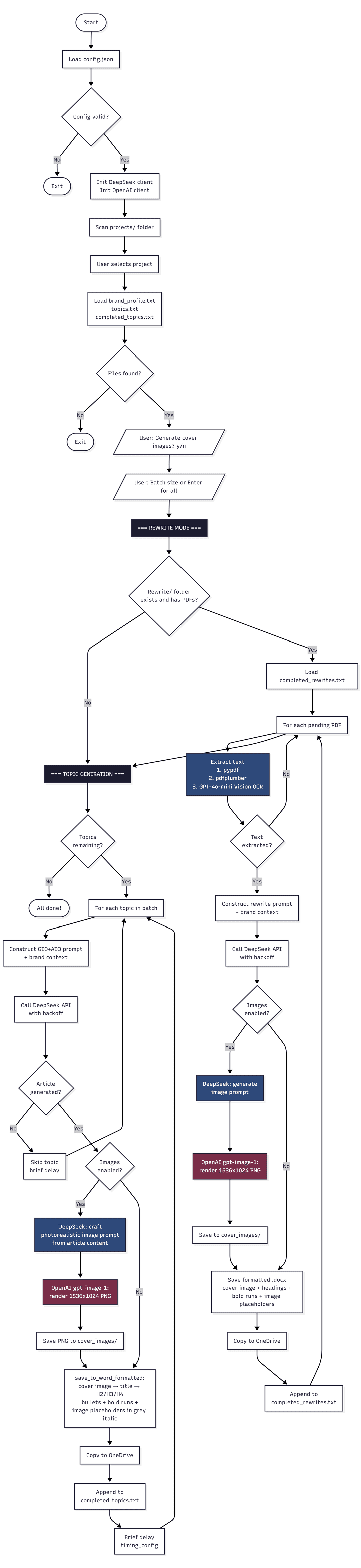
Here's the pipeline end-to-end, for a single article:
- Load
config.jsonand initialize both API clients - User selects a project from the
projects/folder - Script loads
brand_profile.txtandtopics.txt, checkscompleted_topics.txtto skip already-done topics - User toggles cover image generation on/off, and chooses a batch size
- Rewrite mode runs first — scans
Rewrite/for PDFs, extracts their text, and rewrites them in GEO+AEO format - Topic generation runs — for each pending topic, construct a brand-aware GEO+AEO prompt, call DeepSeek with exponential backoff, optionally chain into an image render, assemble the .docx, log completion, sync to OneDrive, brief delay, repeat
Every block here was once a manual task. Now it's just another function.
The Prompt Engineering
The most important part of this project wasn't the code — it was the prompt engineering. You can't just throw "write me a blog post" at an LLM and expect gold.
The system targets GEO (Generative Engine Optimization) and AEO (Answer Engine Optimization) — the new SEO. That means structuring articles so AI search engines like Google's SGE, ChatGPT Browse, Perplexity, and Copilot can extract direct answers from them. Here's what every prompt enforces:
- Conversational H2/H3 subheadings phrased as user questions ("What makes X essential for modern businesses?")
- Immediate value in the first paragraph — no intro fluff, just a direct answer to the main query
- E-A-T signals: expert language, specific data references, authoritative framing
- Image placeholders in an exact machine-readable format:
[Image title: keyword-rich title. Alt text: full descriptive sentence] - FAQ section (3–5 questions) compatible with FAQ schema
- SEO Keywords (5+ intent-based long-tail queries)
- Meta description under 160 characters
- "Last Updated" timestamp for freshness signals
def construct_full_article_prompt(topic, brand_context):
    return f"""I want you to generate a high-quality, long-form,
GEO + AEO-optimized article titled: "{topic}"

{brand_context}

[Full article requirements: question-based H2/H3 structure,
 E-A-T signals, 3–5 image placeholders with titles and alt text,
 FAQ section, SEO keywords, meta description, "Last Updated"
 timestamp. Min 1,000 words. Markdown format.]
"""
The brand context is loaded fresh from brand_profile.txt per project — so every single prompt is both topic-specific and brand-aware.
The API Layer
The call to DeepSeek is robust with exponential backoff:
def call_deepseek_api(client, prompt, deepseek_config):
    retry_delay_seconds = 15
    for attempt in range(4):
        try:
            response = client.chat.completions.create(
                model=deepseek_config['model_name'],
                messages=[{"role": "user", "content": prompt}],
                max_tokens=deepseek_config['max_tokens'],
                temperature=0.7,
            )
            return response.choices[0].message.content
        except Exception as e:
            if ("429" in str(e) or "503" in str(e)) and attempt < 3:
                print(f"  > Rate limited. Retrying in {retry_delay_seconds}s...")
                sleep(retry_delay_seconds)
                retry_delay_seconds *= 2
            else:
                return None
Basic, but effective — especially when generating hundreds of articles in a row. Failures don't stop the flow; the topic gets skipped and logged, and the next one picks up immediately.
The Cover Image Pipeline
This was a two-step AI chain I'm particularly proud of.
- DeepSeek reads the first 2,000 characters of the generated article and produces a cinematic, photorealistic image prompt — describing a real scene with specific lighting, depth of field, and subject matter that matches the article's topic.
- OpenAI
gpt-image-1renders that prompt as a 1536×1024 PNG (16:9 landscape, ideal for article headers).
The image is saved to cover_images/ and embedded directly at the top of the Word document, before the article title. If the image already exists from a previous partial run, it's reused — no redundant API calls.
The Rewrite Mode
Not all content starts from scratch. We had a library of existing articles — some as PDFs — that needed to be brought up to GEO+AEO standard. The rewrite pipeline handles this automatically with a three-tier extraction fallback:
- pypdf — fast, for text-based PDFs
- pdfplumber — handles complex layouts
- GPT-4o-mini Vision OCR — page-by-page rendering for scanned/image-based PDFs
The Vision OCR fallback deserves a mention — it renders each PDF page as a PNG at 2× resolution, sends it to GPT-4o-mini, and stitches the extracted text back together. It handles scanned documents that would return empty strings from any text-based extractor. The output is saved as a formatted .docx and logged to completed_rewrites.txt.
The Word Document Formatter
The .docx output is not just a text dump. The save_to_word_formatted function does real rich formatting:
- Cover image centered at the top (6.5" wide)
- Title as a
Heading 0(document title style) - H1/H2/H3/H4 Markdown headings mapped to proper Word heading levels
- Bullet and numbered lists with correct Word styles
- Inline
**bold**text parsed and applied as actual bold font runs - Image placeholders rendered as centered, italic, grey 10pt text — visually distinct from body copy
- All body paragraphs justified at 11pt
Filenames are sanitized to strip Windows-forbidden characters and capped at 80 characters:
def sanitize_filename(name: str) -> str:
    name = re.sub(r'[\\/*?:"<>|]', "", name)
    return name.replace(" ", "_")[:80]
No more broken saves. No more manual renaming.
OneDrive Sync
Once a file is saved, it's automatically copied to a project-specific OneDrive folder if one is configured in config.json:
def copy_to_onedrive(file_path, project_name, onedrive_paths):
    destination_dir = onedrive_paths.get(project_name)
    if destination_dir:
        shutil.copy2(file_path, destination_dir)
Finished articles land in the shared drive without anyone lifting a finger.
The Result
With the pipeline running, I went from producing 5–10 articles per hour manually to generating 150–200 fully formatted, cover-image-equipped articles in the same time — all while multitasking.
Start the script. Choose a project. Hit Enter. Go make coffee. Come back to a folder full of branded, GEO+AEO-optimized, image-headed Word documents, already synced to OneDrive.
It didn't just save time — it made our pre-launch SEO strategy viable in a way that manual production never could have been.
Could It Be Better?
Absolutely. If I had more time:
- Multi-threading for parallel topic processing across CPU cores
- A lightweight web interface so non-technical teammates can queue batches without touching a terminal
- CMS API integration to push finished articles directly into WordPress or Webflow as drafts
- Quality scoring — running a second LLM pass to rate each article before saving, and flagging low-confidence outputs for human review
But for what it was — a last-minute recovery mission with high stakes and a hard deadline — it worked flawlessly across multiple client projects simultaneously.
Final Thoughts
This project wasn't about AI for AI's sake. It was about solving a human problem — one that was boring, repetitive, and dangerously time-consuming.
The engineering here spans two AI providers, a multi-project file system, three-tier PDF extraction, a two-step image generation chain, rich document formatting, and automatic cloud sync. None of it is over-engineered. Every piece exists because a real workflow demanded it.
Writing code that writes content isn't a shortcut — it's a force multiplier. When you're staring down 500 deliverables and you're the only one in the room, it's easy to freeze. But the moment you ask, "How can I engineer my way out of this?", you flip the table. You go from content grunt to content engineer.
And honestly? It feels good to watch the machine do the heavy lifting for once.